
I Built a Brand Color Generator Inside Systeme.io
Here's the thing about brand colors: every business needs them, but almost nobody has a clean, fast way to go from "I like this image" to "here are my six brand colors" without opening three different tools, screenshotting hex codes, and losing track of which shade was the primary one. So I built a tool that does all of it in one place, and I built it inside a Systeme.io raw HTML block to prove a point.
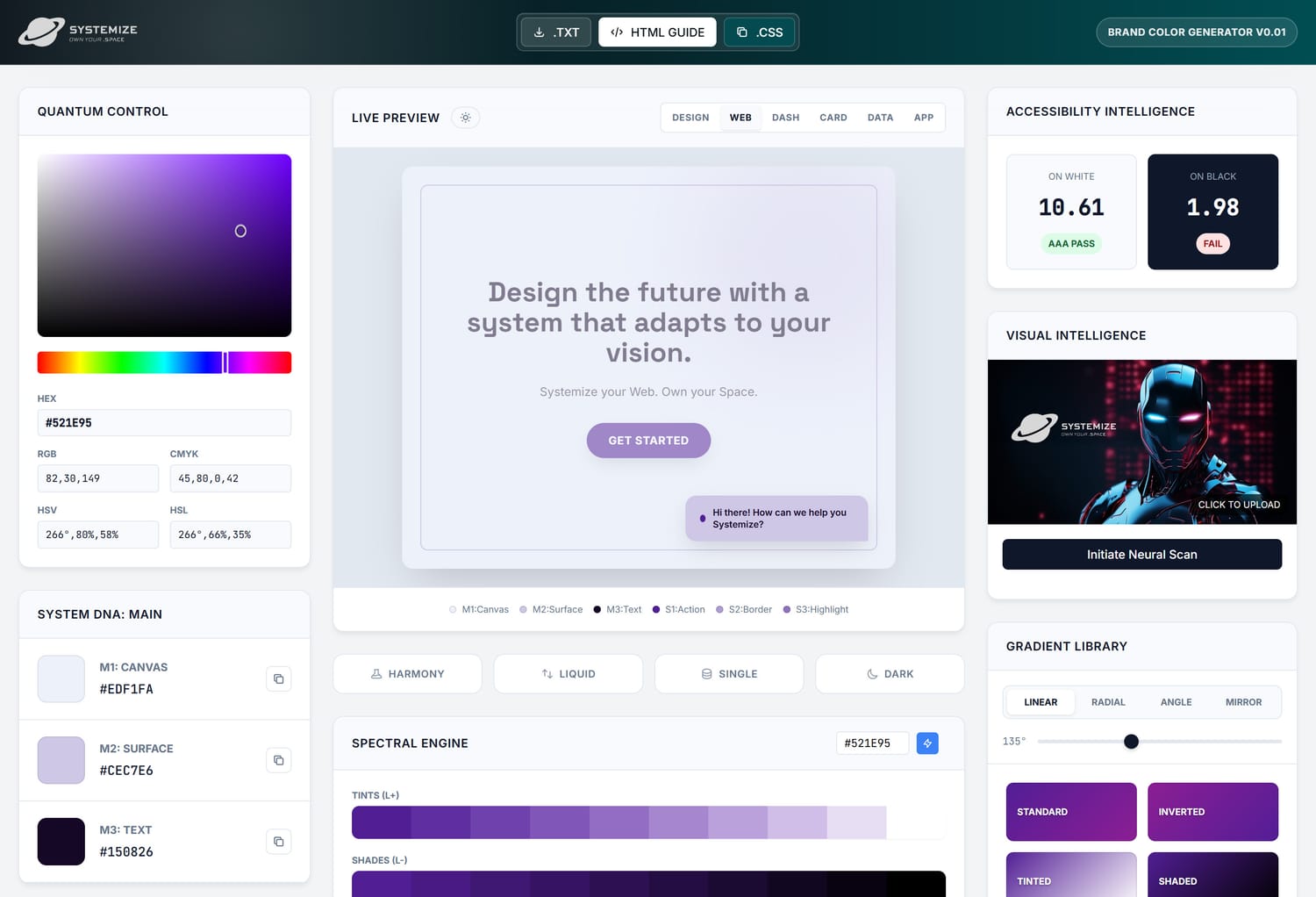
The Brand Color Generator running inside a Systeme.io page. Upload any image and create your brand color palette.
Try the Brand Color Generator
Upload any image, extract your brand colors, and download a complete brand color guide in under a minute. Free, no sign-up, runs entirely in your browser.
Open Brand Color GeneratorWhat you're looking at above is a fully functional web application. It runs in the browser, processes images using the Canvas API, lets you select your brand colors interactively, and exports the results in three different formats. No backend. No server. No API keys. Just HTML, CSS, and JavaScript living inside a single raw HTML block on a Systeme.io page.
The Brand Color Problem Nobody Talks About
When you're using AI chat models to create custom components for your Systeme.io website, one thing that makes or breaks the result is consistency. If you ask an AI to build you a pricing table on Monday and a testimonial section on Wednesday, but you never gave it your brand colors, you get two components that look like they belong to different websites. Branding is what turns a collection of AI-generated components into a cohesive, professional site. But most people skip this step because it feels complicated. Open an image, extract some hex codes, figure out which ones are primary and secondary, format them for your prompts, and hope the AI interprets them correctly.
This tool cuts that entire process down to seconds. Upload an image that captures the feeling you want, pick your 3 primary and 3 secondary brand colors, and copy the CSS variables straight into your AI prompt. Now every component you generate, whether it's a hero section, a feature grid, or a custom footer, follows the same visual identity automatically. It's the fastest way to go from "I like these colors" to "my entire site looks like it was designed by one person" because, in a sense, it was. Your brand colors become the creative DNA that runs through everything the AI builds for you.
The real value isn't in picking colors. It's in having a structured, exportable brand color system you can actually use across your entire business, from your website to your email sequences to your social media templates.
How to Use the Brand Color Generator
I designed this tool to be dead simple. No accounts, no onboarding flow, no paywall. You open the page, you upload an image, and you're picking colors within seconds. Here's the exact flow:
-
Open the tool and upload your image
Head over to the Brand Color Generator. You'll see a clean upload area. Click it to upload any image. It can be a JPG, PNG, WebP, anything your browser supports. This is the starting point: the image that represents the colors you want for your brand.
-
Review the extracted color palette
Once your image is uploaded, the tool analyzes every pixel and surfaces the dominant colors. You'll see a spread of colors extracted from the image, organized so you can see the full range. This is where the fun starts because you're working with real colors from something you already love, not guessing from a color wheel.
-
Select your 3 primary and 3 secondary brand colors
Here's where intentionality matters. Pick your 3 primary colors first. These are the core of your brand. Think logo, main headings, primary buttons. Then pick your 3 secondary colors. These support the primaries: backgrounds, subtle accents, hover states, secondary text. The tool gives you full control over which colors go where.
-
Export your brand color guide
This is where the tool really delivers. You can save your palette as a .txt file with all the HEX, RGB, and HSL values. You can download a fully styled .html brand color guide that looks professional and works as a shareable reference document. Or you can copy your complete set of CSS custom properties straight to your clipboard and paste them into your project.
-
Use your colors everywhere
Paste your CSS variables directly into your prompts when asking AI chat models to create Systeme.io components for you. Every section, every layout, every interactive element the AI generates will follow your brand colors. Your .html brand color guide becomes the single source of truth you can always reference. One process, one tool, consistent branding across everything you build.
Try the Brand Color Generator now
Upload any image, extract your brand colors, and download a complete brand color guide in under a minute. Free, no sign-up, runs entirely in your browser.
Open the Brand Color GeneratorWhat Makes This Tool Different
There are color extraction tools out there, I know. But most of them solve one piece of the puzzle. They give you hex codes and leave you to figure out the rest. I wanted something that handles the entire workflow, from the moment you find an image you love to the moment you have usable code and a shareable reference document. Here's what this tool does that most others don't:
-
Upload any image for color extraction
Click to upload any image. The tool accepts any image format your browser supports. It uses the HTML5 Canvas API to analyze the actual pixel data of your image, extracting the real colors that make up the visual composition. No approximations, no stock palettes. The colors come directly from the content you already know resonates with your brand.
-
Structured 3 primary + 3 secondary system
This isn't just "here are some colors." The tool enforces a clear brand color structure: 3 primary colors for your core brand identity and 3 secondary colors for supporting elements. This framework gives your palette actual hierarchy and purpose. Your primary colors define your brand's face, while your secondary colors create depth, context, and usability across different backgrounds and contexts.
-
Download a styled .html brand color guide
This is the feature that makes the tool genuinely useful for teams and client work. The HTML export generates a self-contained, beautifully styled brand color reference document. Open it in any browser, send it to your designer, share it with your team. It displays all six colors with their HEX, RGB, and HSL values, organized by primary and secondary. It's a real deliverable, not just a list of numbers.
-
Copy CSS custom properties instantly
One click copies your complete brand color system as ready-to-use CSS variables.
--color-primary-1through--color-secondary-3, formatted and ready to paste into your next AI chat model prompt for Systeme.io. This is how you keep every AI-generated component on your site in the same visual style. No manual formatting, no typos, no mismatched colors. You go from color selection to a consistent brand identity across your entire site. -
100% browser-based, zero data leaves your device
Everything happens locally in your browser. Your images are never uploaded to any server. The color extraction runs through the Canvas API on your device. Your selections stay in memory until you export them. This is genuinely private by design, which matters more than most people realize when they're uploading brand assets to random online tools.
Behind the Build: Pushing Systeme.io's HTML Block to Its Limits
Here's the part that excites me the most about this tool, and honestly the real reason I built it. This entire application runs inside a single raw HTML block within Systeme.io's page builder. Not embedded in an iframe. Not linked to an external page. Not powered by a third-party widget. The HTML, CSS, and JavaScript that make this tool work are all pasted directly into one of Systeme.io's raw HTML blocks.
I keep hearing people say that Systeme.io is limited when it comes to customization. That you need external tools, plugins, or workarounds to do anything beyond the basics. And sure, if you only use the default editor with the default elements, there's a ceiling. But that ceiling gets blown wide open the moment you start working with raw HTML blocks properly. This tool is living proof of that.
Think about what's happening here: an image upload interface, pixel-level color analysis via the Canvas API, an interactive color selection system, three different export formats including file downloads and clipboard operations, responsive design, and a polished UI. All running inside a content block that most people use to paste simple text or a YouTube embed. The raw HTML block in Systeme.io is not a limited feature. It's a full rendering surface. The limitation is in how people think about using it.
Building this tool was also a test. I wanted to see exactly where the boundaries are. Can a raw HTML block handle file input operations? Yes. Can it process Canvas data and perform real-time computations? Yes. Can it trigger file downloads and clipboard writes? Yes. Can it maintain a clean, interactive interface with proper state management? Absolutely. The only real constraint is your understanding of what's possible, not the platform itself.

Built by Alp from ALPXWEB
Solo builder, designer, and the person behind Systemize Space. Every tool, component, and article on this platform is built by one person using custom code inside Systeme.io. No team, no agency, no shortcuts. Just intentional craft and a lot of testing.
The Vault: Get the Full Source Code
If you've been following Systemize Space for a while, you know about the Vault. It's the resource library where I keep the actual codes and prompts behind Systeme.io components I build. The Brand Color Generator tool, unlike other tools, is no exception. The complete, fully-commented source code for this entire tool, HTML, CSS, and JavaScript, is available inside the Vault right now.
Why does that matter? Because this tool isn't just something you use. It's something you can learn from, modify, and make your own with your own branding. Paste the code into an AI chat model, prompt the changes you want, and have a personalized color tool for yourself and your audience. The code is clean, readable, and built with the same design system principles I use across all of Systemize Space.
The Vault also includes the broader Design System that maps how to use custom code across every page type in Systeme.io: Website pages, Blog posts, Funnel steps, and Course pages. If you want to start building your own custom layouts or premium designs inside Systeme.io, the Vault gives you the blueprints and the working code to do it, and of course support where you get stuck in the process, teaching you to become independent but you are not alone.
Access the Vault
Get the complete source code for the Brand Color Generator, the full Design System, AI prompts for coding and design, and build guides. Everything you need to start building premium, custom experiences inside Systeme.io.
Explore the VaultYour brand deserves more than random hex codes in a notepad file.
Frequently Asked Questions
How does the Brand Color Generator extract colors from an image?
The tool uses the HTML5 Canvas API to analyze your uploaded image pixel by pixel. It samples the dominant colors from the image data, clusters them by hue and saturation, and presents you with a curated selection of the most representative colors. You then manually choose your 3 primary and 3 secondary brand colors from that palette, ensuring the final selection matches your vision rather than relying on an algorithm alone.
What can I download from the Brand Color Generator?
You get two export options. First, a .txt file containing your 6 selected brand colors with their HEX, RGB, and HSL values. Second, a complete brand color guide downloaded as a styled .html file that you can open in any browser, share with your team, or use as a reference document. You can also copy your colors as ready-to-use CSS custom properties directly from the tool.
Is the Brand Color Generator really free to use?
Yes, completely free. No sign-up, no account, no email capture, no limitations. You upload an image, pick your colors, and download your brand color guide. It runs entirely in your browser, meaning no data is sent to any server. Your images and color choices stay private.
Can I use this tool on mobile devices?
Yes. The Brand Color Generator is responsive and works on phones, tablets, and desktops. You can upload images from your device's gallery or camera, select your brand colors, and download the results. The interface adapts to smaller screens so you can build your brand palette from anywhere.
Why was this tool built inside a Systeme.io raw HTML block?
This tool is a working proof of what's possible when you push Systeme.io's raw HTML blocks beyond basic formatting. The entire application, including image processing, color extraction, interactive color selection, and file downloads, runs inside a single HTML block within Systeme.io's page builder. No external plugins, no embedded iframes, no third-party tools. It was built by Alp from ALPXWEB to demonstrate that you can create real, functional web applications inside Systeme.io with the right approach to custom code.
How do I copy CSS variables from the Brand Color Generator?
After selecting your 3 primary and 3 secondary colors, the tool generates ready-to-use CSS custom properties in the format --color-primary-1, --color-primary-2, --color-primary-3, and --color-secondary-1, --color-secondary-2, --color-secondary-3. Click the copy button and the complete CSS variable block is copied to your clipboard. You can paste it directly into your stylesheet or Systeme.io custom CSS settings.
Can I get the full source code for this tool?
Yes. The complete, fully-commented source code for the Brand Color Generator is available in the Vault, the resource library on Systemize Space. The Vault includes this tool's code along with other HTML components, AI prompts, a design system, and build guides, all built specifically for Systeme.io's raw HTML block system.