
Motion Load Tool is Live
So this is something I have been working on for a bit. The Motion Load Tool is the second free tool on Systemize Space, and it does one thing really well: it adds motion to your Systeme.io pages without you touching a single line of code. It launched with load-in animations. Fade in, slide up, reveal on scroll, scale into view. You copy your element ID, pick a motion, paste the code, and you are done. That is the whole thing.
But then you guys started asking for more. You wanted elements that keep moving even after the initial load-in. So I listened, went back in, and upgraded the tool to v0.02 with Parallax Scroll. Now your rows, images, and text blocks actually respond to how far someone has scrolled. Everything shifts at different speeds and creates this layered depth that makes a flat Systeme.io page feel like it has real dimension to it.
One tool, built because you asked for it. Load-in animations and scroll-driven movement, no CSS knowledge needed. You copy, you paste, you publish.
What It Does
Here is what the tool actually does. You point it at any element on your Systeme.io page, pick the kind of motion you want, tweak a few settings if you feel like it, and the tool generates the exact CSS you need. You paste that into a raw HTML block and the motion just works. No JavaScript. No external libraries. Nothing that slows your page down. Just clean CSS running right there in the browser.
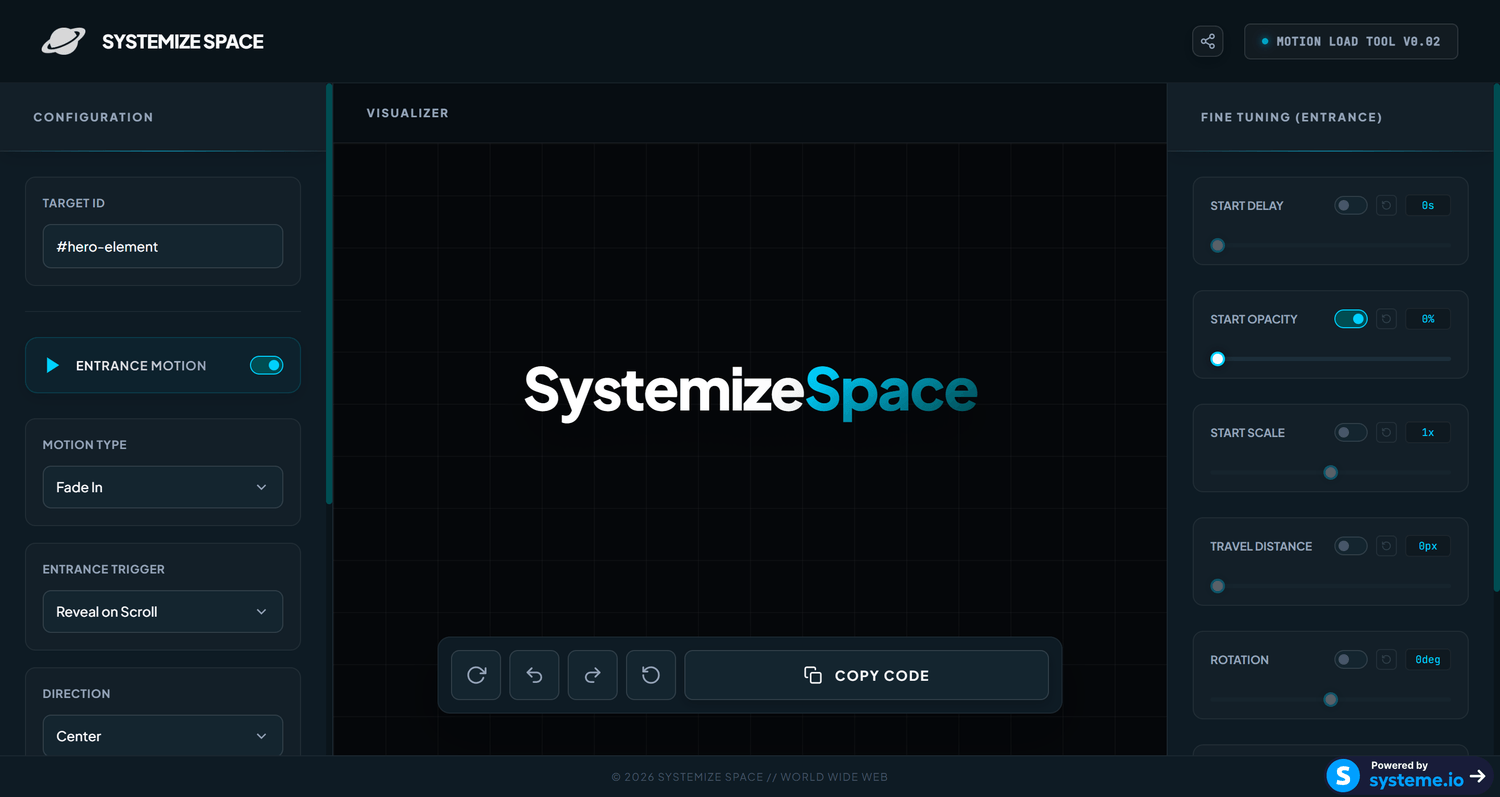
The Motion Load Tool. Pick a motion, customize it, copy the code.
Launch the Motion Load ToolLoad-In Motions
When I first built this, I started with the animations people were asking for the most. The ones that actually make a difference on a real page. And every single one is adjustable for speed, delay, and direction, so it fits your page naturally instead of looking like some generic effect someone slapped on top.
- Rows: Make entire rows slide or fade into view. If you have a long landing page or a sales page, this is how you make each section feel like it is actually arriving instead of just sitting there.
- Fade + Slide: The one everyone wants. Elements start invisible and slightly offset, then smoothly fade in while sliding into place. Works on text blocks, images, buttons, anything you want to feel polished.
- Text: Reveal text line by line or word by word. It gives headings and body copy this cinematic quality without you changing a single thing about your actual content.
- Reveal: Elements show up as if they are being uncovered. Clean, editorial, the kind of animation you see on premium sites. Great for image galleries, feature grids, and product showcases.
- Images: Scale and fade images into view. Perfect for testimonial sections, portfolio rows, or anywhere the visual matters and you want it to land with impact.
- Scale In: Elements grow from a smaller size to their full dimensions. It adds this energy and emphasis to key content like pricing cards, CTA sections, or hero areas.
Infinity Motion: Continuous Loop Mode
There is one feature I want to call out on its own because it changes what you can do. Infinity Motion. Normally a load-in animation fires once when the element appears and then it is done. Infinity Motion makes it repeat continuously. So instead of a one-time entrance, you get this ongoing ambient movement. Floating icons, pulsing badges, rotating elements, anything that needs to feel alive the entire time someone is on the page. It is a small toggle in the tool but it completely changes the vibe of whatever you apply it to.
How It Works
Four steps. Same straightforward workflow as every tool I build.
-
Copy your element ID
Open your Systeme.io page builder, click the element you want to animate, open its settings, scroll to the bottom, and find the ID attribute field under (Advanced) HTML attributes. Copy that value. That is your target.
-
Paste into Target ID
Open systemize.space/motion-load-tool and drop your ID into the Target ID field. This is how the tool knows exactly which element on your page to animate.
-
Customize your motion
Pick the motion type you want and adjust the speed, delay, and direction until it feels right. Want it to loop forever? Toggle Infinity Motion on. The preview updates live so you can see exactly what you are getting before you copy anything.
-
Copy the CSS and activate
Hit copy. Go back to your Systeme.io page builder, drag a raw HTML block right under the element you want to animate, and paste the code inside. Save and preview. The motion is live.
The v0.02 Update: Parallax Scroll
After I launched the tool, a lot of you reached out and said the same thing. The load-in animations are great, but they only handle the first impression. Once someone scrolls past, the motion is over and everything goes back to being static. You wanted something that keeps the page feeling alive the whole time someone is on it. So I built Parallax Scroll into the v0.02 update. It ties element movement directly to how far down the page someone has scrolled.
The idea is simple but the result is something else. As someone scrolls, the element you targeted moves at a different speed than everything else on the page. It creates this layered depth effect, the same thing you see on those high-end production sites where background images drift slower than the text in front of them. The page starts feeling three-dimensional. And you control how subtle or dramatic it is through the speed settings in the tool.
Here is why this matters for Systeme.io users. Parallax effects are basically impossible on the platform without custom code. You get rows, columns, and elements, but there is no built-in way to make them respond to scroll behavior. This update fixes that completely. You paste your element ID, pick a speed and direction, and the tool writes the exact CSS to make it happen. No JavaScript, no scroll event listeners, no library imports. Just paste and go.
- Scroll-driven movement: Elements shift as someone scrolls, creating depth that flat static pages simply cannot match.
- Adjustable speed and direction: You decide how fast and which way the element moves. Keep it subtle or make it dramatic. Your call.
- Works on any element with an ID: Rows, images, text blocks, anything. Use it on backgrounds for depth or on foreground elements to draw attention.
- Same workflow you already know: Copy element ID, paste into the tool, tweak it, copy the CSS, paste into a raw HTML block. Nothing new to figure out.
Parallax Scroll turns a flat Systeme.io page into something that actually feels spatial. Elements moving at different speeds as you scroll, the same technique award-winning sites use, now available to every Systeme.io user through this tool.
Frequently Asked Questions
-
What is the Motion Load Tool?
The Motion Load Tool is a free tool I built on Systemize Space that generates CSS motion effects for any Systeme.io element. It includes load-in animations like fade, slide, reveal, and scale, plus Parallax Scroll for scroll-driven movement that I added in the v0.02 update after you guys asked for it. Copy your element ID, pick a motion, and paste the code into a raw HTML block.
-
How do I find my element ID in Systeme.io?
In the Systeme.io page builder, click on the element you want to animate, open its settings, scroll to the bottom, and find the ID attribute field under (Advanced) HTML attributes. Copy that value and paste it into the Motion Load Tool.
-
What motion types does the tool support?
The tool supports load-in animations including Rows, Fade + Slide, Text, Reveal, Images, and Scale In. The v0.02 update added Parallax Scroll for scroll-driven movement. Every motion type is customizable with adjustable speed, delay, and direction.
-
What is the Infinity Motion loop mode?
Infinity Motion is a loop mode in the Motion Load Tool that makes your animation repeat continuously instead of playing once on page load. It is ideal for elements you want to keep in perpetual motion, such as floating icons, pulsing badges, or rotating elements.
-
What is Parallax Scroll in v0.02?
Parallax Scroll was added to the tool in the v0.02 update after the community started asking for scroll-driven effects. It makes elements move in response to the user scrolling the page. You can adjust the speed and direction, creating a layered depth effect. It works on rows, images, and any other Systeme.io element with an ID.
-
Is the Motion Load Tool free to use?
Yes. The Motion Load Tool is completely free. Visit systemize.space/motion-load-tool to use it directly in your browser. No sign-up required.
-
Where do I paste the generated code in Systeme.io?
In the Systeme.io page builder, drag a raw HTML block and place it directly under the element you want to animate. Paste the generated CSS code inside that raw HTML block. The motion effect will apply automatically.