There is a new free tool on Systemize Space. The Social Follow Builder v0.01 does exactly what it sounds like. It helps you build clean, branded social follow buttons for your Systeme.io pages. No signup. No login. No account required. You open it, you build your buttons, you copy the snippet, and you paste it into your page. That is the whole workflow, and it takes about two minutes from start to published.
I built this because every Systeme.io creator, course builder, marketer, and online business owner runs into the same problem. You want a social follow section that actually looks good and matches your brand. The default options on the platform are limited. Custom code means either writing it yourself or pasting something from a tutorial that was built for a generic site and does not fit yours. The Social Follow Builder fixes that. You get full control over the design, you see exactly what it looks like before you commit, and the output is a clean, lightweight HTML+CSS snippet that works perfectly inside a raw HTML block.
Create a premium social follow section for your Systeme.io page. Branded buttons, live preview, clean snippet. Copy, paste, done.
What It Does
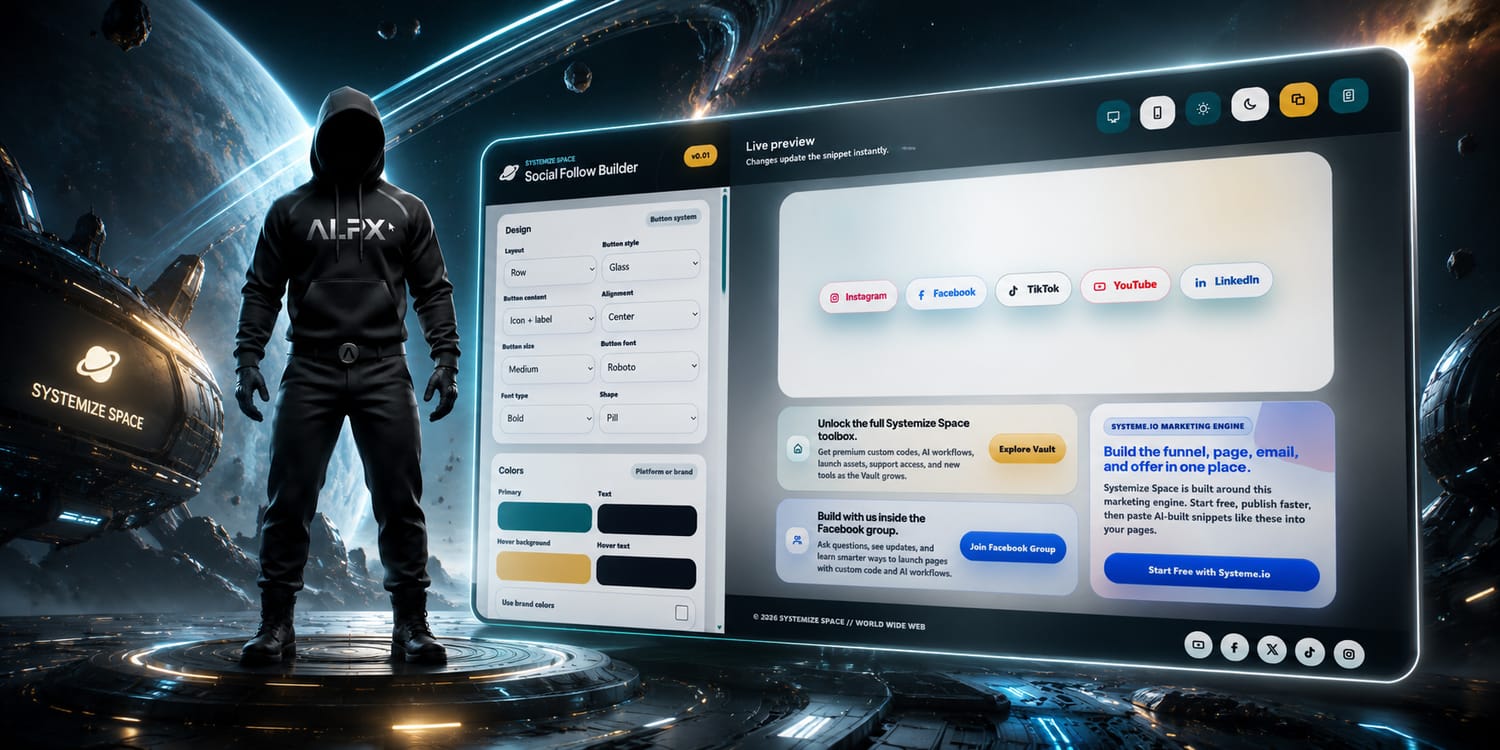
Here is what the tool actually gives you. You pick the platforms you want, you customize every visual detail, and you preview the result live on both desktop and mobile. When it looks right, you copy the generated snippet and paste it into your Systeme.io page. The snippet is self-contained HTML+CSS. No JavaScript. No tracking. No external dependencies. It loads fast, it looks native, and it does not interfere with anything else on your page.
The Social Follow Builder. Pick your platforms, customize the design, preview on desktop and mobile, copy the snippet.
The tool supports twelve platforms and two custom options. That covers basically every social presence a creator or business would want to promote on their Systeme.io page. You toggle on the ones you need, add your profile URLs, and the rest are hidden from the output. No leftover placeholder buttons, no empty slots. Only what you actually use makes it into the snippet.
Instagram, Facebook, TikTok, YouTube: The big four. These are the platforms most creators and businesses lead with, and the tool gives each one its own icon and brand color by default. You can override every color to match your own palette if you want.
LinkedIn and X: Professional and real-time platforms. LinkedIn for B2B creators, consultants, and anyone building authority. X for builders who live in the conversation. Both get proper branded icons and links straight to your profile.
WhatsApp, Telegram, Discord: Community and messaging platforms. If you run a group, a channel, or a server, these buttons let visitors jump straight in. One click from your page to your community.
Reddit and Pinterest: Visual and community-driven platforms. Pinterest for creators with visual content, product boards, or design portfolios. Reddit for niche communities and authentic engagement. Both included.
Website and Email: Not every follow is a social follow. Some people want your homepage. Some want to email you directly. The tool includes a custom website link and an email button so visitors can reach you however they prefer.
Customization Controls
Every visual detail of your social follow section is adjustable. This is not a pick-from-three-templates situation. You have real control, and the live preview updates instantly every time you change something. Here is what you can adjust.
Layout and alignment: Choose how your buttons are arranged. Horizontal row, vertical stack, grid, centered, left-aligned, right-aligned. The layout determines how the section fits into your page, and you can see it update in real time as you switch between options.
Button style, shape, and size: Rounded, pill, square, circle, diamond. Small, medium, large. Icon-only, icon with label, text-only. Every combination is available so the buttons look like they were designed for your brand, not picked from a dropdown of generic options.
Colors and hover colors: Set your base button colors and your hover colors separately. Default to each platform's brand color, or override everything with your own palette. The hover state is where the interaction comes alive, and you control exactly what that looks like.
Shadow and motion: Add depth with shadow options and subtle motion on hover. These are the details that separate a basic button row from something that feels designed. A slight lift on hover, a soft shadow underneath, and your section instantly looks more premium without you writing a single line of CSS.
Button font and font type: Control the typography inside your buttons. Pick the font family and the weight so the text on your social buttons matches the rest of your page. Brand consistency down to the letter.
How It Works
Four steps. The same straightforward workflow as every tool I build. No learning curve, no setup, no friction.
Choose your platforms
Open the Social Follow Builder and toggle on the platforms you want to include. Instagram, Facebook, TikTok, YouTube, LinkedIn, X, Pinterest, WhatsApp, Telegram, Discord, Reddit, website, or email. Add your profile URLs for each one. The ones you leave off do not show up in the output.
Customize the design
Adjust the layout, button style, shape, size, colors, hover colors, shadow, motion, font, and font type. Every setting updates the live preview instantly. Keep tweaking until the section looks like it belongs on your page, because it does. This is your brand, your buttons, your design.
Preview on desktop and mobile
Toggle between desktop and mobile preview. This is important because a button row that looks great on desktop can stack or squeeze on mobile. The tool shows you exactly how your section will look on both, so there are no surprises after you publish. What you see in the preview is what you get on your live page.
Copy the snippet and paste into Systeme.io
When everything looks right, hit copy. Go to your Systeme.io page builder, drag a raw HTML block where you want the social follow section, and paste the snippet inside. Save and preview. Your branded social buttons are live.
There is something I want to call out specifically because it matters more than most people think. The output of this tool is HTML+CSS only. No JavaScript. No tracking scripts. No external font imports you did not ask for. No hidden dependencies that load from a server somewhere and slow your page down. Just a clean, self-contained snippet that does one thing and does it well.
This is a deliberate design decision. Every time you add JavaScript to a page, you add weight, you add potential conflicts, and you add something that can break. Systeme.io pages are already running their own scripts for the page builder, analytics, and whatever else you have connected. The last thing you need is another script fighting for priority. The Social Follow Builder keeps it simple. The snippet is pure HTML and CSS. It renders instantly, it never conflicts with anything else on your page, and it will still work perfectly five years from now because it does not depend on any library or runtime that could change.
The preview in the tool is built to match the exported result exactly. There is no "it looked different when I pasted it" situation. What you see in the preview is the same HTML and CSS that gets copied to your clipboard. The same code runs in both places, which means the result is predictable and reliable every single time. Here is a live preview of the generated snippet rendered exactly as it appears on a published page.
Live preview. The buttons render exactly like this on your published Systeme.io page.
HTML+CSS only: No JavaScript in the output. The buttons are pure markup and styles. They render immediately when the page loads, no waiting for a script to initialize, no risk of a JavaScript error breaking your social section.
No tracking: The snippet does not phone home. It does not load tracking pixels, analytics scripts, or anything that monitors your visitors. Your social follow section is between you and your audience. That is how it should be.
Lightweight and fast: The snippet is small. It adds virtually nothing to your page weight. No external requests, no font imports unless you chose them, no image files to load. Icons are inline SVG, styles are embedded, and the whole thing is a single block of code that lives inside your raw HTML element.
No complicated setup: Copy. Paste. Done. That is the entire setup process. There is nothing to configure after you paste the code, nothing to connect, nothing to authorize. The snippet works the moment it lands on your page.
Systemize your web. Own your space. The Social Follow Builder gives you branded social buttons without the bloat. HTML+CSS, no JavaScript, no tracking, no compromises. Just clean code that works.
The Social Follow Builder is a free tool I built on Systemize Space that helps you create clean, branded social follow buttons for your Systeme.io pages. You pick your platforms, customize the layout, style, colors, and hover effects, preview on desktop and mobile, then copy the HTML+CSS snippet and paste it into a raw HTML block. No signup, no login, unlimited use.
Which social platforms does the tool support?
The tool supports twelve platforms and two custom options: Instagram, Facebook, TikTok, YouTube, LinkedIn, X (Twitter), Pinterest, WhatsApp, Telegram, Discord, Reddit, a custom website link, and email. Toggle on the ones you need, add your profile URLs, and the rest stay hidden from the output.
Is the Social Follow Builder free?
Yes. The Social Follow Builder is completely free. No signup, no login, no account required. Just open systemize.space and start building. Unlimited use.
Where do I paste the generated code in Systeme.io?
In the Systeme.io page builder, drag a raw HTML block and place it where you want the social follow buttons to appear. Paste the generated HTML+CSS snippet inside that block. The buttons will render automatically on your published page.
Does the snippet use JavaScript?
No. The generated snippet is HTML+CSS only. No JavaScript, no tracking scripts, no external dependencies. It is lightweight, fast-loading, and fully self-contained. Your social follow section will render immediately without waiting for any script to load.
Can I preview the buttons on mobile?
Yes. The tool includes a live preview with desktop and mobile toggle. You can see exactly how your social follow buttons will look on different screen sizes before you copy the code. The preview is built to match the exported result, so what you see is what you get.
Can I customize the button colors and hover effects?
Yes. The tool gives you full control over button colors, hover colors, shadow, motion effects, shape, size, font, and font type. Every detail can be adjusted so the snippet looks native to your brand. The live preview updates instantly with every change.

What It Does
Here is what the tool actually gives you. You pick the platforms you want, you customize every visual detail, and you preview the result live on both desktop and mobile. When it looks right, you copy the generated snippet and paste it into your Systeme.io page. The snippet is self-contained HTML+CSS. No JavaScript. No tracking. No external dependencies. It loads fast, it looks native, and it does not interfere with anything else on your page.
The Social Follow Builder. Pick your platforms, customize the design, preview on desktop and mobile, copy the snippet.
Launch the Social Follow BuilderPlatforms You Can Add
The tool supports twelve platforms and two custom options. That covers basically every social presence a creator or business would want to promote on their Systeme.io page. You toggle on the ones you need, add your profile URLs, and the rest are hidden from the output. No leftover placeholder buttons, no empty slots. Only what you actually use makes it into the snippet.
Customization Controls
Every visual detail of your social follow section is adjustable. This is not a pick-from-three-templates situation. You have real control, and the live preview updates instantly every time you change something. Here is what you can adjust.