
Your Video's Missing a Button
What if your video didn't just explain the offer... but showed the next step at the exact moment people are watching? That's the idea behind the Video CTA Generator v0.01. Design a branded CTA button, choose when it appears with a delay timer, preview it on your video, and export the code. Paste it into a Raw HTML element on Systeme.io. That's it.
What you're looking at above is a live example of the output. A video playing with a branded CTA button that appears right on top of it after a timed delay. The button doesn't show immediately, it shows at the moment you choose. That timing control is what separates a CTA that feels random from one that feels intentional. And the code behind it? Clean, self-contained, ready to paste into a Systeme.io raw HTML block.
Try the Video CTA Generator
Design a branded CTA button for your video in under a minute. Free, no sign-up, runs entirely in your browser.
Open Video CTA GeneratorThe Passive Video Problem
Your video just said the thing. The line that makes people think "I need this." And right there, at that exact second, there's nothing for them to click. The CTA is somewhere below the fold. Or on another section entirely. The viewer has to break their attention, scroll away from the video, and hunt for the next step. Most of them won't. They'll close the tab, tell themselves they'll come back, and never do. That's not a traffic problem. That's a timing problem.
The fix is two things: put the button where the eyes already are, and show it at the right moment. Not below the video. Not in a sidebar. Directly on top of the video, appearing exactly when your viewer is most engaged. Not at second zero when they haven't heard anything yet. Not after the video ends when they've already moved on. At the moment your message lands. That's what the delay timer in this tool does. You choose when the button appears, and the animation handles the rest.
The best CTA isn't the one with the cleverest copy. It's the one that's visible at the exact moment the viewer decides to act. Everything else is just a hope that they'll scroll.
How to Use the Video CTA Generator
I built this tool to be fast and frictionless. No accounts, no tutorials, no learning curve. You open the page, fill in a few fields, see the result in real time, and copy the code. Here's the exact flow:
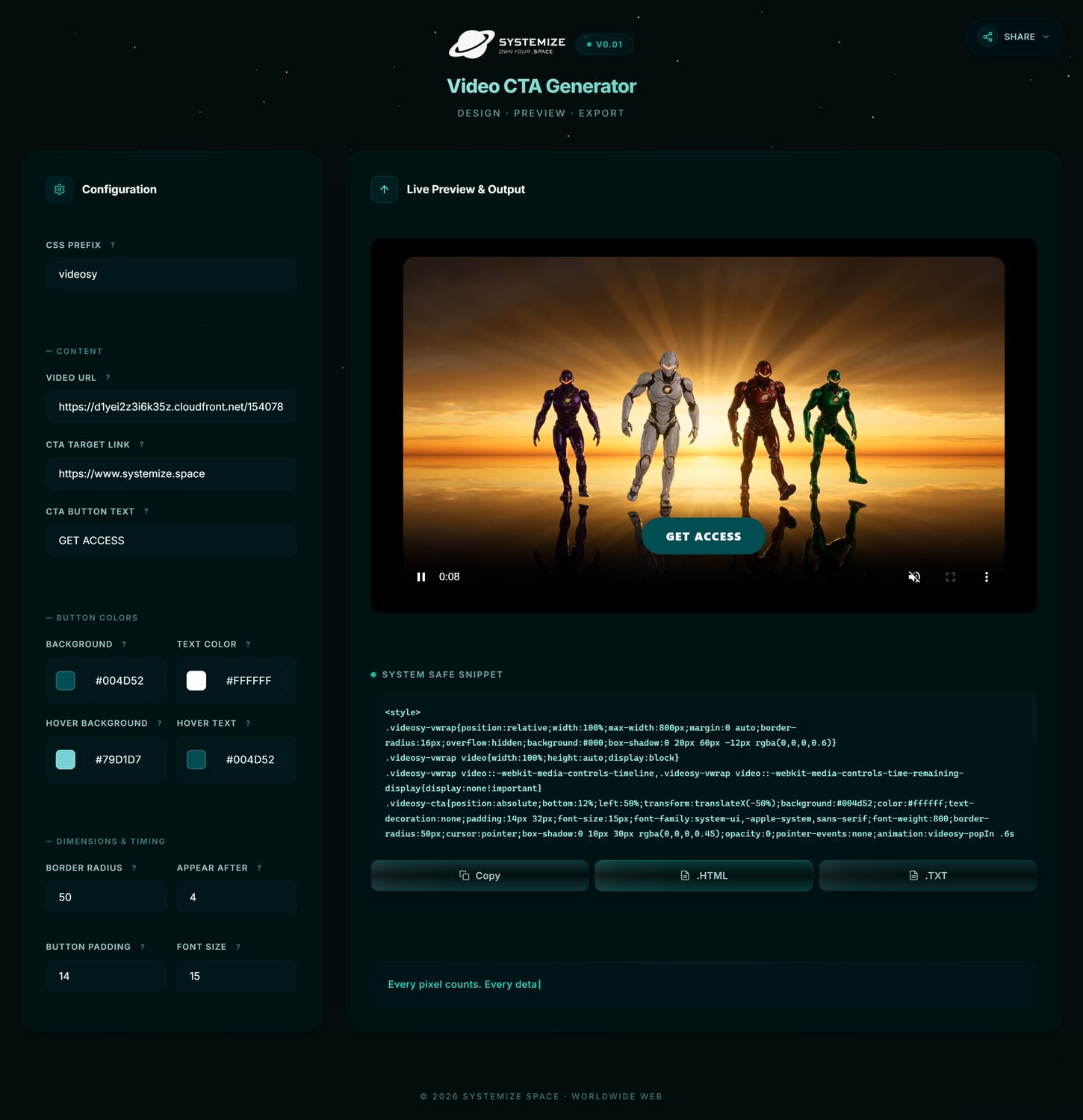
The Video CTA Generator interface. Fill in your inputs, customize colors and timing, preview the result live on your video, and copy the generated code.
-
Open the tool and fill in your inputs
Head over to the Video CTA Generator. You'll see clean input fields for your video URL, your CTA button text, and the destination link where you want the button to send people. This is the foundation: tell the tool what your button says and where it goes.
-
Add your video details
Enter your video URL. The tool will use it to load your video in the preview so you can see exactly how the CTA button looks on top of your actual content. This matters because the same button can feel very different depending on the colors and movement in the video behind it.
-
Adjust the button colors and timing
Choose the button's background color, text color, and styling to match your brand. Then set the delay, how many seconds into the video the button appears. This is where timing matters. You want the button to show at the moment your viewer is most engaged, not before they've heard your message. While you're editing the button design, set the delay to 0 so the button appears instantly and you can see your color and styling changes in real time. Once everything looks right, set the delay back to your chosen timing and export.
-
Preview the result with your timing
Watch the preview with the delay set to your chosen timing. See exactly when the button appears relative to the content of your video. Does it land at the right moment? Adjust the delay if needed. When the timing, colors, and text all feel right, you're ready to export.
-
Copy the code and paste it into a Raw HTML element
Click the copy button to grab the generated code. Go to your Systeme.io page editor, add a Raw HTML element, and paste. That's the entire process. Publish your page and your video now has a branded CTA button overlay that appears at the exact moment you chose.
Try the Video CTA Generator now
Design a branded CTA button for your video in under a minute. Free, no sign-up, runs entirely in your browser.
Open Video CTA GeneratorWhat Makes This Tool Different
There are plenty of tools that let you add a button to a video. Most of them require embedding through a third-party service, paying for a subscription, or accepting someone else's branding on your player. I wanted something that lives entirely inside Systeme.io, gives you full control over the design, and produces code that belongs to you. Here's what this tool does differently:
-
Branded CTA button directly on your video
The CTA button sits on top of your video as an overlay, not next to it or below it. The viewer sees the button while they're watching, at the exact moment their attention is highest. This is the fundamental difference between a passive video and one that actively drives action. Your video becomes a conversion point, not just a content block.
-
Full color customization for brand consistency
Choose your button's background color, text color, and styling to match your brand. While you're editing the design, set the delay to 0 so the button appears instantly and you can see your color changes in real time. No preset palettes, no locked themes. Your brand colors, your button, your way.
-
Delay timer for the perfect moment
Choose exactly when the button appears, in seconds. Not at second zero when the viewer hasn't heard anything yet, and not after the video ends when they've already moved on. At the moment your message lands. This timing control is what turns a CTA overlay from a gimmick into a real conversion tool.
-
Clean exportable code for Systeme.io
One click copies the complete code to your clipboard. Paste it into a Raw HTML element on any Systeme.io page and it just works. The code is clean, self-contained, and uses no external dependencies. No iframes, no third-party scripts, no embedded widgets. Your page, your code, your CTA.
-
Works on every device, no plugins needed
The generated code is fully responsive. The CTA button adapts to different screen sizes and remains clickable and readable on phones, tablets, and desktops. Most of your viewers will be watching on their phones, so this isn't a nice-to-have. It's the whole point. Your CTA needs to work where your audience actually is.
-
100% browser-based, zero data leaves your device
Everything happens locally in your browser. No sign-up, no account, no data sent to any server. Your video URLs, button text, color choices, and generated code all stay on your device. This is privacy by design, not privacy by policy.
Behind the Build: Another Raw HTML Block, Another Proof of Concept
Here's what excites me most about this tool, and the real reason I keep building things like this. The entire Video CTA Generator, the input forms, the live preview, the color customization, the code generation, all of it runs inside a single raw HTML block within Systeme.io's page builder. Not in an iframe. Not linked to an external page. Not powered by a third-party service. The HTML, CSS, and JavaScript are pasted directly into one raw HTML block.
I keep hearing that Systeme.io is limited when it comes to customization. That you need external tools, plugins, or workarounds to do anything beyond the default drag-and-drop editor. And if you only use the default elements, sure, there's a ceiling. But that ceiling disappears the moment you start working with raw HTML blocks properly. This tool, the Brand Color Generator, and everything else I build on Systemize Space is living proof of that.
Think about what's happening here: a form-based interface that takes your inputs, renders a live video preview with a CTA button overlay, processes your color choices in real time, and generates production-ready code you can paste into any Systeme.io page. All running inside a content block that most people use to paste simple text or a YouTube embed. The raw HTML block in Systeme.io isn't a limited feature. It's a full rendering surface. The only real constraint is how you think about using it.
This tool also demonstrates something practical for anyone using AI chat models to build Systeme.io pages. The Video CTA Generator gives you the exact colors, the working code, and the visual reference you need to prompt an AI effectively. You can take the generated code, paste it into an AI chat model alongside your brand color variables, and ask for modifications, enhancements, or entirely new variations. The tool isn't just an endpoint. It's a starting point for your AI-assisted workflow.

Built by Alp from ALPXWEB
Solo builder, designer, and the person behind Systemize Space. Every tool, component, and article on this platform is built by one person using custom code inside Systeme.io. No team, no agency, no shortcuts. Just intentional craft and a lot of testing.
More Tools, Code & Resources in the Vault
The Vault is the resource library on Systemize Space. It's where I keep working HTML components, custom code built specifically for Systeme.io's raw HTML blocks, AI prompts for coding and design, and build guides that walk you through creating premium layouts inside Systeme.io. If the Video CTA Generator gave you a taste of what's possible with custom code inside Systeme.io, the Vault is where you find more tools and resources that follow the same approach.
The Vault also includes a Design System that maps how to use custom code across every page type in Systeme.io: Website pages, Blog posts, Funnel steps, and Course pages. Each page type has its own rules and possibilities, and the design system lays them out clearly so you know exactly where and how to place your code. And there's support where you get stuck, because the goal is to teach you to become independent, not to keep you dependent. You're not alone in this.
Explore the Vault
Find more tools, working HTML components, AI prompts, and build guides, all built for Systeme.io's raw HTML block system.
Open the VaultStop hoping they'll scroll. Put the button where the eyes already are.
Frequently Asked Questions
What is the Video CTA Generator?
The Video CTA Generator is a free browser-based tool that lets you design a branded call-to-action button that appears directly on top of your video. You fill in your button text, choose your colors, preview the result, copy the generated code, and paste it into a Systeme.io raw HTML block. The button overlays your video and links to wherever you want people to go next.
How do I add the CTA button to my Systeme.io page?
After designing your CTA button in the tool and copying the generated code, go to your Systeme.io page editor, add a Raw HTML element, and paste the code directly into it. The video with the CTA button overlay will render on your published page. No plugins, no embeds, no external tools required.
Can I customize the button colors to match my brand?
Yes. The tool gives you full control over the button's background color, text color, and styling. You can adjust the colors to match your brand identity precisely. The preview updates in real time as you make changes, so you can see exactly how the button will look on your video before exporting the code.
Is the Video CTA Generator free to use?
Yes, completely free. No sign-up, no account, no email capture, no limitations. You open the tool, design your CTA button, preview it, copy the code, and paste it into your Systeme.io page. Everything runs in your browser with no data sent to any server.
Does this work on mobile devices?
Yes. The Video CTA Generator is responsive and works on phones, tablets, and desktops. The generated code is also responsive, meaning the CTA button will adapt to different screen sizes and remain clickable and readable on mobile devices where most of your viewers will be watching.
Why was this tool built inside a Systeme.io raw HTML block?
This tool is a working demonstration of what's possible when you push Systeme.io's raw HTML blocks beyond basic formatting. The entire application, including the input forms, live preview, color customization, and code generation, runs inside a single HTML block within Systeme.io's page builder. No external plugins, no iframes, no third-party services. Built by Alp from ALPXWEB to show that real, functional web tools can live directly inside Systeme.io.
What else is in the Vault?
The Vault is Systemize Space's resource library containing working HTML components, AI prompts for coding and design, a design system that maps how to use custom code across Systeme.io's Website, Blog, Funnel, and Course pages, and build guides. Everything is built specifically for Systeme.io's raw HTML block system.